sexta-feira, 14 de setembro de 2012

How to program flash games

In this article I would like to talk a little about  Programação de games  log which offers some tutorials taught to make flash games.

Including one that teaches how to make a game of nature in flash. Below is an image of the game ship ready.


If you want to develop your games or access the blog of the creator of the channel Computer Tips Games and also creator of Programming Games.

Blog Scheduling games: Provides an index of flash tutorials along with downloading the design of each video lesson.

Youtube Channel: It has all the video lessons, but it is recommended that you first look at the blog and the types of games you want to choose to develop the game click on it and be redirected to the video.

Below are some of the tutorials available:
Shooting game in flash;
Music player with volume control in flash;
Game drive in style minigame in flash;
Game shooting in flash;
Platform game in flash;

quarta-feira, 12 de setembro de 2012

How to remove toolbars from Internet Explorer, Firefox and Chrome


Many free programs on the internet take advantage of the fact that you need them to install something else on your computer, most often an advertisement in the form of a flat "toolbar" that sits on top of your browser forever without offering a way to remove.

To remove these toolbars, there is a free program you can download called "Toolbar Cleaner."


After installing the Toolbar Cleaner, open the program to choose which toolbars you want to remove. He already shows separating the browser you have installed on your computer to make your life easier.

Information about the program
Size: 1.00 MB
License: Free and Complete Distributed by manufacturer


Download Army Rage

Army Rage is a game of first-person shooter (or FPS, its acronym in English) that takes you back to the 1940s, during the conflict period of the Second World War.


According to its developers, the game has a different purpose from others in the genre, starting with the fact name yourself a "MMOFPS", ie an online first-person shooter in which thousands of players face.

System requirements for Army Rage
Intel Pentium 4 2.0 or AMD Athlon 64 3200
1 GB of RAM
Video Card 256 MB
2 GB of available hard disk space

Game Information
Size: 712.00 MB
License: Free and Complete Distributed by manufacturer


terça-feira, 11 de setembro de 2012

How to download a game without clickjogos program


Many people who enjoy online games from sites like: clickjogos, jogos10, etc. jogosonline. do not know how to download these games and will play wherever wait too long until the game is loaded.
In this tutorial I will be teaching you how to download these games, which are in swf format.

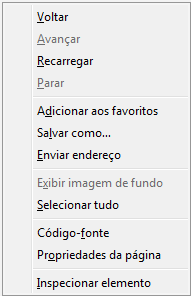
1 - First click with the right mouse button on the game page you want to download, some sites will be difficult to find somewhere to stay and as you click on the image below, so click in various places until they succeed.


2 - After that click on "Page Properties" and then "Media", like the image below, then "Address" search that ends in some swf select it and click "Save As." Ready! your game will be saved on your computer so you will not need an internet connection when you want to play.

If you prefer you can also see a tutorial that teaches you how to download these games with a program by clicking aqui.

How to download a swf without program


In this tutorial I will be teaching you how to download a file without flash program. You can download your games from websites, animations etc..

1 - First go to the page you want qeu download the swf file and press right like the image below, in some sites when you press right not appear that way so tighten in several locations until it succeeds.


2 - After that click on "Page Properties" and "Media" and look for an address that ends in. Swf select it and hit "save as" ready! Your swf will be saved on your computer.


How to download a swf


Moyea Free Flash Downloader is a handy program downloade swf, which can easily download SWF files and flash games from Internet. With a built-in flash player, SWF files can be previewed before downloading.

It provides easy access to online SWF sources and flexible ways to download them. With simple integration with a SWF converter also can edit and convert those downloaded SWF files and games to other popular video formats for playback on various portable devices.

To download your swf you just simply copy the link of the page where it is.


Information about the program
Size: 1.9 MB
License: Free and Complete Distributed by manufacturer

How to partner with blogs or websites


The partnership between blogs or websites is intended to increase the PageRank of your blog or website in Google. It is updated a few times a year and works as follows: Google increases the PageRank of blogs or websites that contain links to other blogs or websites, so it is important to partner and have many links scattered, but links in comments or on Youtube . Do not count and also remember that PageRank is per page and not per site or blog, so sometimes you can have a PageRank, which runs from 0/10, 2 on the homepage, but other pages can be 0 or even 10.

FAQ:

What is the purpose of the partnership between blogs or websites?
Increase your Google PageRank.

Where to find blogs or sites to partner?
When entering any blogs or sites search menu with the name "Partnership"

How do I know what my PageRank?
To calculate your pagerank use the generator below:

Verifique o PageRank de qualquer página da web instantaneamente: