terça-feira, 11 de setembro de 2012

How to download a game without clickjogos program


Many people who enjoy online games from sites like: clickjogos, jogos10, etc. jogosonline. do not know how to download these games and will play wherever wait too long until the game is loaded.
In this tutorial I will be teaching you how to download these games, which are in swf format.

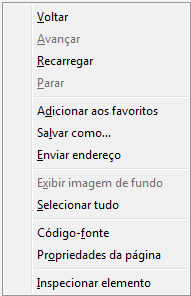
1 - First click with the right mouse button on the game page you want to download, some sites will be difficult to find somewhere to stay and as you click on the image below, so click in various places until they succeed.


2 - After that click on "Page Properties" and then "Media", like the image below, then "Address" search that ends in some swf select it and click "Save As." Ready! your game will be saved on your computer so you will not need an internet connection when you want to play.

If you prefer you can also see a tutorial that teaches you how to download these games with a program by clicking aqui.

How to download a swf without program


In this tutorial I will be teaching you how to download a file without flash program. You can download your games from websites, animations etc..

1 - First go to the page you want qeu download the swf file and press right like the image below, in some sites when you press right not appear that way so tighten in several locations until it succeeds.


2 - After that click on "Page Properties" and "Media" and look for an address that ends in. Swf select it and hit "save as" ready! Your swf will be saved on your computer.


How to download a swf


Moyea Free Flash Downloader is a handy program downloade swf, which can easily download SWF files and flash games from Internet. With a built-in flash player, SWF files can be previewed before downloading.

It provides easy access to online SWF sources and flexible ways to download them. With simple integration with a SWF converter also can edit and convert those downloaded SWF files and games to other popular video formats for playback on various portable devices.

To download your swf you just simply copy the link of the page where it is.


Information about the program
Size: 1.9 MB
License: Free and Complete Distributed by manufacturer

How to partner with blogs or websites


The partnership between blogs or websites is intended to increase the PageRank of your blog or website in Google. It is updated a few times a year and works as follows: Google increases the PageRank of blogs or websites that contain links to other blogs or websites, so it is important to partner and have many links scattered, but links in comments or on Youtube . Do not count and also remember that PageRank is per page and not per site or blog, so sometimes you can have a PageRank, which runs from 0/10, 2 on the homepage, but other pages can be 0 or even 10.

FAQ:

What is the purpose of the partnership between blogs or websites?
Increase your Google PageRank.

Where to find blogs or sites to partner?
When entering any blogs or sites search menu with the name "Partnership"

How do I know what my PageRank?
To calculate your pagerank use the generator below:

Verifique o PageRank de qualquer página da web instantaneamente:
  

How to delete a Blogger blog


In this tutorial you will learn how to delete and recover a blog on blogger.

For you delete a blog on blogger follow the steps below:

1 - Go to the settings page of your blog and click on the first option will have other "Blog Tools" on the front and the option to delete your blog, like the image below:


How to recover a deleted blog on blogger:

To recover a deleted journal you must access the home page of blogger http://www.blogger.com/home and click "blogs deleted", which is located in the upper left corner underneath "Your blogs" after so you will see a list of their blogs deleted with the "Undelete"

segunda-feira, 10 de setembro de 2012

Removing link protector of blog posts


Some templates comes with protectors link this tutorial will be taught how to remove all these guards at once.

Please note, if you downloaded the templates for your Blogger template is recommended to remove because it is all infected with malware, but if you want to know how to take all click here.
1 - First you must identify that protector click the link that has been protected for example the link below:

http://dl.dropbox.com/u/93265919/download-gratis/download-gratis-cadastro-de-celular.html/?url=http://dl.dropbox.com/u/93265919/download-gratis/download-gratis-cadastro-de-celular.html/?url=w3yh/il.vda//:ptth=lru?/lmth.ralulec-ed-ortsadac-sitarg-daolnwod/sitarg-daolnwod/91956239/u/moc.xobpord.ld//:ptth


NOTE: The part in green is the original link inverted.

2 - After this we can see that the protector is in the red part as dropbox.
3 - Copy the name dropbox go in and edit the html template, first make a backup of your blog
4 - Press Ctrl + f and search for the name dropbox. Here on the blog he was in four places as below. Then delete the part that is blue and all the guards are removed.

]]></b:skin>
<script src='http://dl.dropbox.com/u/73202541/blogger.js'/>
<script src='http://dl.dropbox.com/u/77633893/data-post.js'/>
<script src='https://ajax.googleapis.com/ajax/libs/jquery/1.5.1/jquery.min.js' type='text/javascript'/>
<script type='text/javascript'>
//<![CDATA[


</div>
<script src='http://dl.dropbox.com/u/73202541/blogger.js'/>
<script src='http://dl.dropbox.com/u/77633893/data-post.js'/>
<div style='clear:both;'/>
<div id='footer-container'>


A parte que está em azul poderia ser outros liks como "https://dl.getdropbox.com/u/1944060/cd.js'/>" para você saber qual é siga o passo 1, 2 e 3

Resumo
Nem todos os protetores serão do dropbox por isso resumindo tudo o que você precisa saber é que tem que ver o link com o protetor olhar de qual site é exemplo: http://dl.dropbox.com e excluir ele do html do blog.

Veja também:
Como remover vírus gzip do blog infecção vbs:Malware-gen
How to book in Minecraft 1.3


Book in Minecraft 

In the new version of Minecraft the book can not be done by placing three sheets vertically to make a book you also need leather see in the picture below how to book and sheet.